This specific content was written 13 years ago.
Please keep this in mind as it may be outdated and not adhering to best-practices.
AirServer allows apple mobile devices (Ipads, Iphones) to stream the screen using the airplay protocol.
Unfortunately, AirServer did not work immediately right off the bat on my own machine and required modifying the Advanced firewall settings.
If you see anything appearing even you you have selected Airplay on the device, it may be an issue of the firewall.
In order to test this, disable the firewall for the local network using the instructions here.
On my own computer, I entered the advanced settings of windows firewall and added two inbound rules in order to expose freely the UDP and TCP ports required by AirServer.
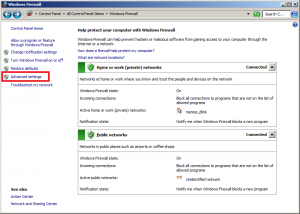


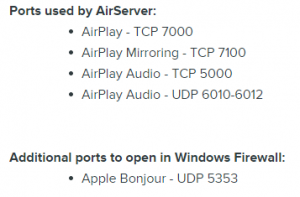
So, if your having issues using AirServer but do not want to disable the firewall add manual rules for the following ports as described on their site.
Jan 24 2014
Allowing/troubleshooting AirServer through windows 7 firewall
AirServer allows apple mobile devices (Ipads, Iphones) to stream the screen using the airplay protocol.
Unfortunately, AirServer did not work immediately right off the bat on my own machine and required modifying the Advanced firewall settings.
If you see anything appearing even you you have selected Airplay on the device, it may be an issue of the firewall.
In order to test this, disable the firewall for the local network using the instructions here.
On my own computer, I entered the advanced settings of windows firewall and added two inbound rules in order to expose freely the UDP and TCP ports required by AirServer.
So, if your having issues using AirServer but do not want to disable the firewall add manual rules for the following ports as described on their site.
By Menelaos Bakopoulos • Tools 0 • Tags: AirServer